
We live in a world where players expect their purchases to "just work" across every device they own. For developers, this presents two massive challenges: navigating the 30% commission fees charged by traditional platforms and ensuring that a "Full Game" unlock purchased on one platform follows the player to the next (when paired with Unified Player Accounts).
Thankfully, LootLocker’s Stripe Integration offers a powerful solution. By moving the transaction to a web-based checkout, you keep more of your revenue while leveraging LootLocker’s account-centric architecture. Whether your player logs in via White Label (Email/Password) or native platform accounts like Steam, Xbox, or PlayStation, their entitlements remain tied to their unique LootLocker ID.
Getting Started
Before you can start selling content through Stripe, ensure you have:
- Created a LootLocker account.
- Downloaded and integrated the LootLocker SDK in Unity.
- Connected your Stripe account in the LootLocker Console under Settings > In-App Purchases > Stripe.
- Created a Catalog and Catalog Listing with an Asset set as reward (e.g., "Full Game Unlock").
The Purchase Flow
Unlike traditional IAP systems that are locked to a specific store, the Stripe flow works by generating a secure checkout link that you open in the player's browser. This keeps the sensitive payment data off your game’s servers while providing a professional, trusted checkout experience.
Initiating the Checkout
To start a purchase, you simply call CreateStripeCheckoutSession with your Item ID. This returns a unique URL that you can launch immediately.
Tracking Purchase Status
Because the payment happens in an external browser, your game needs to "poll" the LootLocker backend to detect when the payment is finalized. We do this by checking the Entitlement Status.
The Polling Routine
We recommend checking every 5 seconds until the purchase is either fulfilled or canceled.
Handling the Status
LootLocker uses the LootLockerEntitlementHistoryListingStatus enum to track the transaction. Once the status hits Active, you can safely unlock your game content.
Syncing Entitlements on Login
Whenever a player starts a session (via White Label, Steam, or any other platform), you should fetch their active entitlements to ensure the "Full Version" is unlocked.
Cross-Platform Persistence
The true power of this system lies in how LootLocker manages player accounts. Because the purchase is linked to the LootLocker Player ID, it doesn't matter if the player moves from a browser version to a downloadable version of the game . As long as they connect to the same account, their game data will follow.
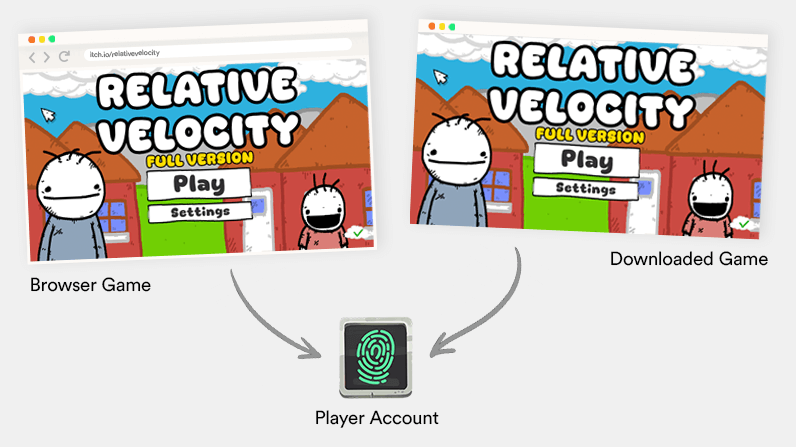
Furthermore, by using Unified Player Accounts (UPA), you can link multiple platform identities (like Steam, Epic, and Playstation) to a single LootLocker account. This ensures that whatever content was purchased via Stripe (or from the other platform stores) remains available to the player regardless of which platform they use to log in (though make sure you double check that the game platforms are okay with this first!).
Conclusion
LootLocker’s Stripe integration empowers you to take control of your game's economy and publishing strategy. By combining secure web-based payments with cross-platform entitlements, you can offer a seamless experience that rewards your players for their loyalty, regardless of where they choose to play.
For more detailed information on managing commerce with LootLocker, check out our official documentation. To get started, try integrating the White Label Login Prefab to own your player identity from day one. If you have any questions or want to show off what you're building, join us on Discord.