Introducing Error Reports: Ship Your Own Diagnostics With Your Game

- Intro
- You decide what gets reported
- What comes back
- What cannot be reported
- Finding what you are looking for
- A short, deliberate window
- What to instrument
- Available now
While you are building your game, you have everything. Logs, breakpoints, a debugger, the ability to reproduce a problem on demand and watch exactly what happens.
The moment you ship, all of that goes away.
A player writes in to say their save did not carry over, or that a reward never showed up, and you are working from a description rather than data. On consoles the gap is even wider. There is no log file you can ask for and no practical way to get diagnostic information off a retail build. You are left guessing at which call failed, on which platform, for which player.
That is what Error Reports is built for. It lets you ship your own reporting alongside your game, so the failures you care about come back to you and land in the LootLocker Web Console where you can actually look at them.
You decide what gets reported
Error Reports is not a net that catches everything. Nothing is stored unless your game explicitly asks for it.
Instead, you pick the code paths that matter and add a report call to the error handling. When one of those calls fails in a live build, the report comes back with the details you need to understand it.
In the Unity SDK, that looks something like this:
LootLockerSDKManager.UpdateFile(<file>, "aFileName", (response) => {
    if (!response.success)
        response.ReportFailure("Player save file upload failed", (errorReportResponse) => { });
});
That is the whole model. One line in the error handler of a call you consider critical, and that call now reports on itself in production. The same pattern is available in the Unreal SDK.
Report at the point of failure rather than storing the response and reporting later. The SDK keeps a short rolling history of recent failed requests to build the report from, so a failure you come back to much later may no longer have its details available.
The description string is yours to write. Most of the time you will want something specific enough to tell you where in your game the failure happened, since the same endpoint might be called from several places. You can also feed it from a free text field and let the player describe what they were doing, which turns a vague support ticket into a report with the technical detail already attached.
What comes back
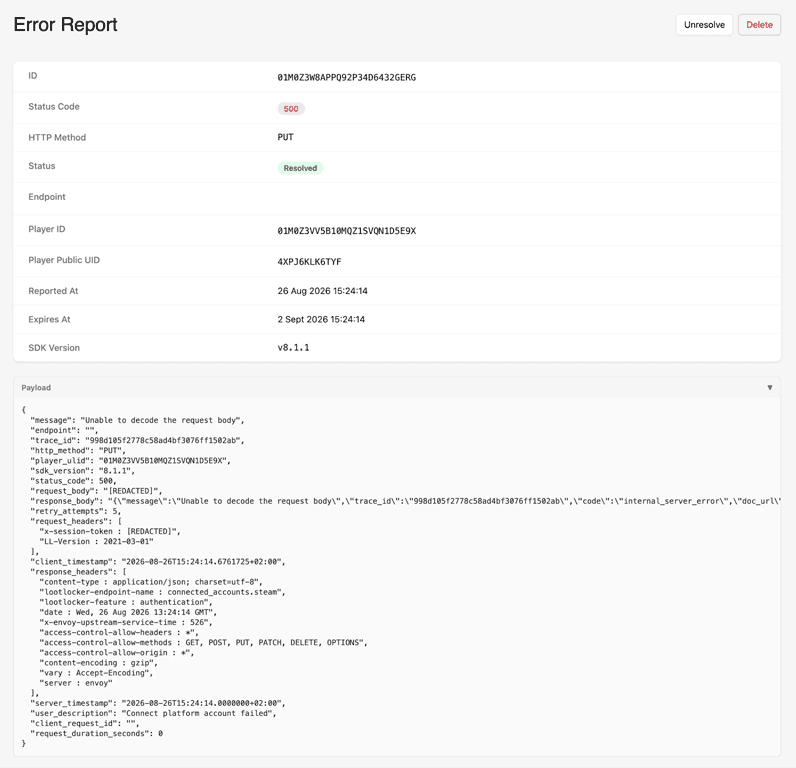
Each report carries the full context of the request that failed. Alongside your description, you get:
- The status code and the error message returned by the API
- The endpoint and HTTP method that were called
- The request and response bodies, and the headers on both
- The player the failure happened to, by both Player ID and Player Public UID
- The request ID and trace ID, which is exactly what our support team needs if you escalate
- Timing and retries: when the client sent it, when the server saw it, how long it took, and how many attempts it made
- The SDK version the build was running
Headers containing tokens, authorization, or cookies are redacted automatically before anything leaves the client, so you are not shipping session credentials into a report view.
That combination is what makes a report actionable. A status code on its own tells you something went wrong. A status code, plus the body you actually sent, plus the SDK version and the player it happened to, tells you why.
What cannot be reported
A report is built from the server's response to a failed request, which means a few cases fall outside it:
- Requests that never got a response. If the connection dropped or the request timed out before the server answered, there is no response to build a report from.
- Unauthorized requests. A 401 means the session token is not valid, so the report itself cannot be trusted or attributed.
- Throttled requests. If a request was rate limited and told to retry later, reporting it would add to the same pressure that caused it.
Everything else that comes back as a failure is fair game, from bad requests and validation errors through to server errors on our side.
Finding what you are looking for
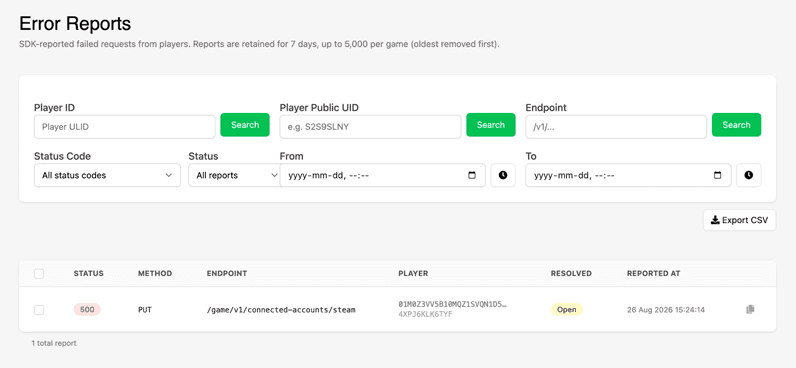
Error Reports live under Moderation in the Web Console. You can filter the list by Player ID, Player Public UID, endpoint, status code, and a date and time range, then export the filtered results as a CSV.
The filters are built around how you actually arrive at the view. If you are working a support ticket, you start from the player. If you are chasing a suspected regression, you start from the endpoint and the window since your last patch. If you want to hand the whole set to an engineer or track a number as you ship fixes, you export it.
A short, deliberate window
Reports are kept for 7 days, up to 5,000 per game, with the oldest removed first.
That is intentional. Error Reports is not an archive and it is not a monitoring platform. It is a way to get answers about a specific problem in a live build, which means the reports that matter are the recent ones. Keeping the window short also keeps the view readable, so what you see is the set of failures you chose to be told about rather than a stream you have to sift through.
The flip side is worth stating plainly: this will not surface bugs you never thought to look for. If you have not instrumented a path, its failures are invisible here. Additionally, instrumenting every path means risking the critical information cycling out of the 5,000 error window too quickly. Error Reports rewards deciding in advance what paths are crucial to have visibility into.
What to instrument
A good starting point is anything where a silent failure costs the player something they cannot recover:
- Save file uploads and downloads, where a failure means lost progress
- Purchases, entitlements, and DLC grants, where the player has paid and not received
- Progression and reward grants tied to a milestone the player only reaches once
Beyond that baseline, the most valuable use is targeted. When you have a bug you cannot reproduce, add reporting to the paths you suspect, ship it, and let the next occurrence tell you what your logs cannot. It works particularly well on consoles, where this is often the only route to that information at all.
Available now
Error Reports are available now under Moderation in the LootLocker Web Console, with support in the Unity and Unreal SDKs.
Head to the Error Reports documentation to get set up, or take a look at our Error Codes reference for more on what LootLocker returns and why.