We are big fans of Discord.
Not only does LootLocker have a thriving Discord community of its own, our technology also powers one of Discord’s most popular Activities, Blackjack. And unless you’ve been living under a rock, you already know that Discord has become the de-facto hub for gaming communities where players gather, share feedback, organize play sessions, and engage directly with developers.
Yet despite its central role, Discord often exists in parallel to the game itself.
Community members and actual players are not always the same people. Developers lack visibility into who is playing, how engaged they are, and how Discord activity maps back to real player behavior in-game. This gap makes it harder to run meaningful community campaigns, reward engaged players, or provide effective support.
So we built Squire (and we call our new aviary acquaintance, Dijon).

What is Squire?
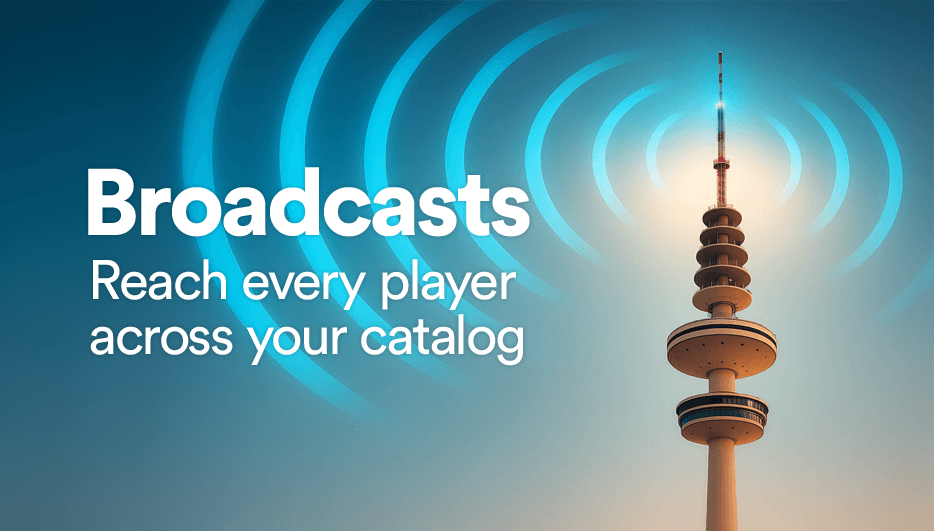
Squire is a Discord bot that connects your Discord community directly to your game through a variety of features, all powered by LootLocker. Features like Platform Keys unlocks a totally new way to distribute game key through Discord. And Discord Broadcasts that makes pushing in-game broadcasts to Discord channels for more consistent messaging across all platforms.
Squire acts as the missing link between Discord communication and identities and real players and their platform IDs, allowing you to understand who your community members actually are in your game and engage with them accordingly.
With Squire, Discord is no longer just a chat platform. It becomes an extension of your game’s backend, community operations, and player engagement strategy.
Why This Matters
By linking Discord users to player platform accounts, Squire allows you to:
- See which community members are actively playing your game
- Understand how much they play (via Presence)
- Measure engagement using real in-game signals such as inventory, progressions, leaderboards, and economy data
- Reward players for meaningful activity in the community
This also dramatically improves community management and support. If a player submits feedback, reports a bug, or raises an issue in Discord, you can immediately see who they are in your game, how far they’ve progressed, what they’ve experienced, and respond with proper context.
Launch Features
Squire launches with two core features that solve practical, real-world problems for developers and publishers, while directly connecting Discord community members to real player IDs.
Platform Game Keys
Squire makes it easy to distribute game keys through Discord, while keeping everything tied back to real player accounts.
No longer do you need to rely on third-party key distribution websites or clunky email systems when your entire community, including streamers, testers, and moderators, already live in Discord.
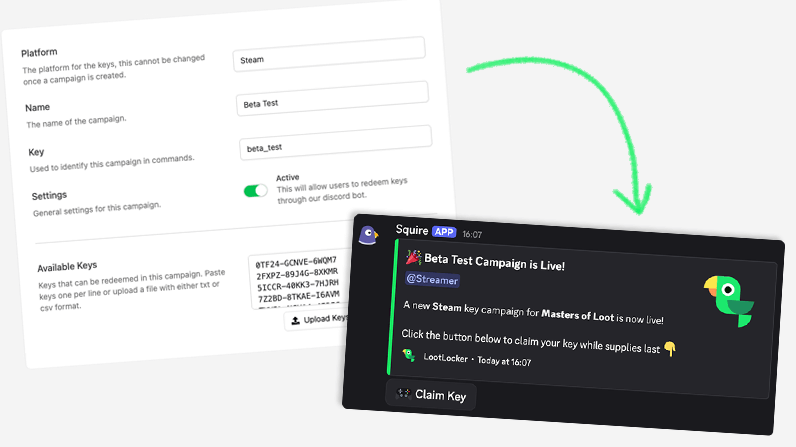
You can distribute keys based on campaign and allow only players with specific roles redeem keys for their platform of choice. Using LootLocker’s Unified Player Accounts (UPA), players connect their Discord ID to their platform ID, creating a secure, verifiable link between Discord and the game.
This unlocks several powerful workflows:
- Restrict game access to verified players only, preventing key resellers from abusing key requests
- Prepare player accounts before the game goes live
- Track which keys were redeemed, who redeemed them, and how long those players actually played
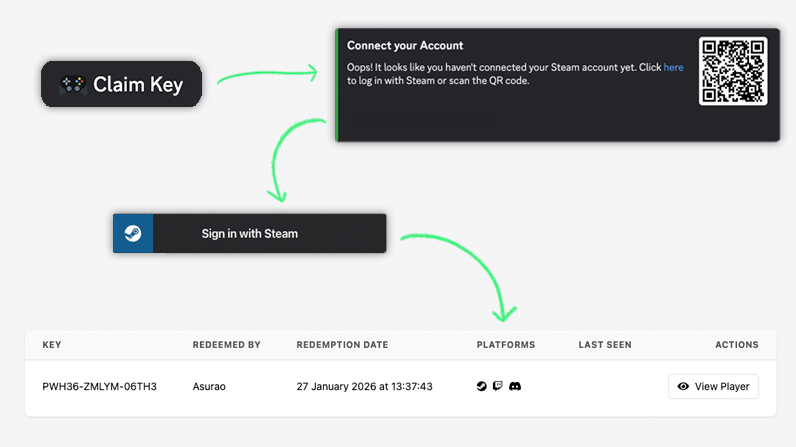
In other words, you close the loop between distribution, access, and real engagement.
Discord Broadcasts
Squire can automatically push your in-game Broadcasts directly into a Discord channel based on the publication schedule of the Broadcast.
This makes it far easier to keep your messaging consistent across platforms. News, updates, events, and announcements shared in-game can now appear instantly in Discord without duplicating effort or risking inconsistent communication.
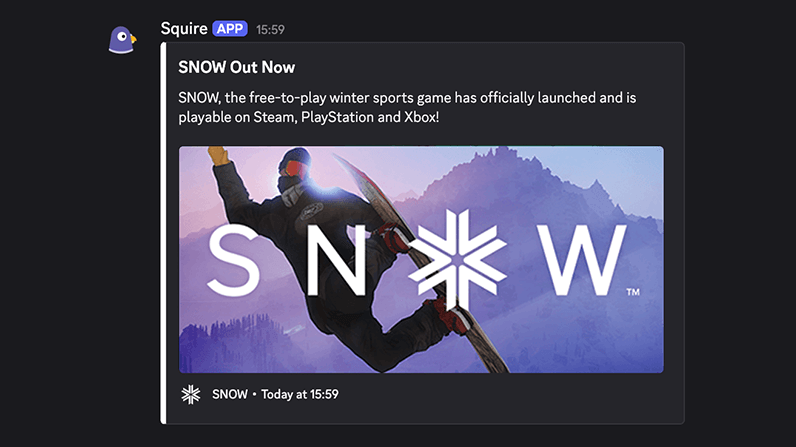
Your players see the same message, in the same tone, regardless of where they are.
What’s Coming Next
This is just the beginning. One of the next major features we’re working on is reward campaigns directly in Discord.
These campaigns will allow players to claim in-game rewards via interactive buttons in Discord, again powered by UPA to ensure rewards are granted to the correct player account.
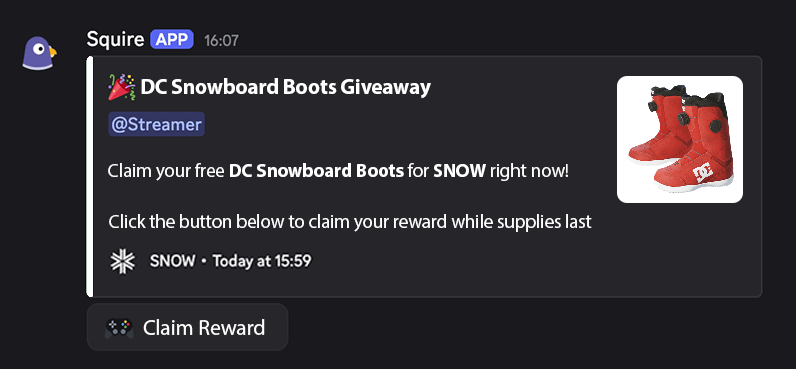
This opens up a wide range of possibilities:
- Drive players to your Discord during development and reward early community members at launch
- Run time-limited campaigns during playtests, Next Fest, or live weekends
- Reward players for engaging with news, updates, or events shared in Discord
- Turn community participation into tangible in-game value
All without manual key distribution, spreadsheets, or guesswork.
Discord, But Connected
By grounding community activity in real player data, Squire helps you build stronger relationships with your players, run more effective campaigns, and operate your community with a level of insight you should expect to have both in-game and outside of it.
With Squire, Discord becomes more than a community hub. It becomes part of your game’s publishing motion and ecosystem.
Getting started takes only a few minutes:
- Add Squire to your Discord server by clicking Invite Squire to Server in the LootLocker Web Console.
- Link your Discord server to your LootLocker game by generating a token in the Web Console and entering it in Discord using the
/setup [token]command. - Configure channels, roles, and styling to control where Squire posts, who can interact with it, and how it appears in Discord.
- Start using Squire by setting up Platform Key campaigns or pushing Broadcasts directly to your Discord server.
Once installed, Squire immediately begins turning your Discord from a passive community space into an active extension of your game: connecting players, data, and engagement in one place.
Squire is available now. Install the bot (we have documentation too), connect your game, and start engaging your community with real player context today!