What's new.
A platform that gets better every week.

Users: Can we have dark mode?
LootLocker: We have dark mode at home
(But if you want to rebel, click your profile pic in the top right and pick your own mode. Go on — live dangerously.)


With Player Insights, you can now visualize essential player metrics directly in your LootLocker web console, giving you an instant overview of your game’s health and audience composition. LootLocker currently provides the following core metrics: Platform Distribution: Total players and a breakdown of which platforms they’re playing on Daily Active Players: Unique player sessions per day New…
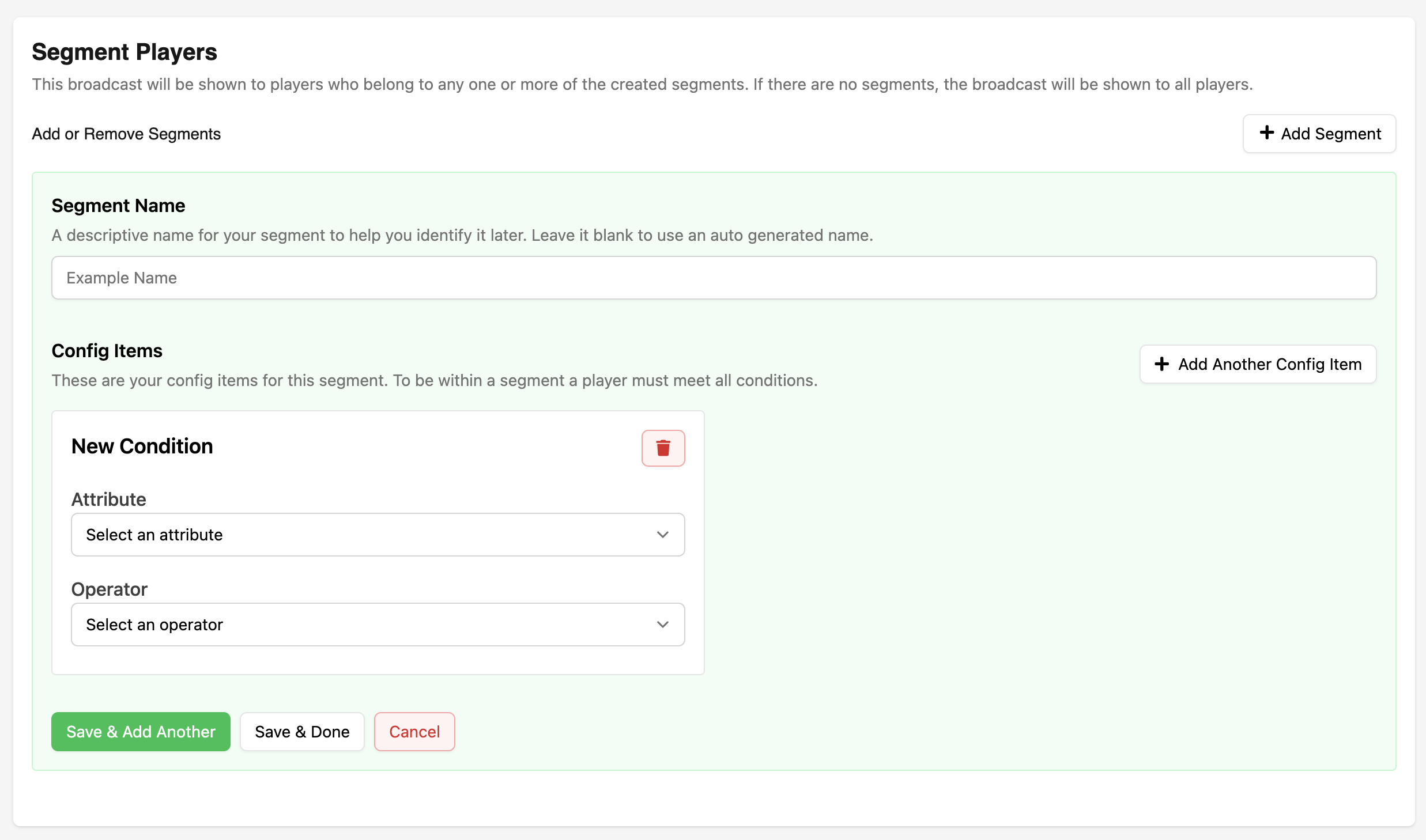
We've launched Player Segments for Broadcasts, allowing you to target messages to specific groups of players based on: Their platform (Steam, Nintendo, PlayStation, etc.) When they were last seen in-game The date they were first seen Here are some examples of how segments can be used: Announcing platform-specific events or updates to players on a particular console Promoting sales or discounts…

Added pagination to the Relationships tab for improved performance and usability with large datasets. Enhanced catalog management with detailed information and fuzzy search currency selection across components. What's included: Relationships Paginated Tables: Display relationships with configurable items per page (5, 10, or 25) Easy Navigation: Move between pages using previous/next buttons, page…

🎉 Unity SDK v6.4.0 is released 🎉 🚀 New: Epic & Google Play Player Lookup support! 🎮 Bug fixes include: proper catalog key usage in ListCatalogItemsV2, improved session handling, better parameter management, and enhanced stability for callback exceptions.
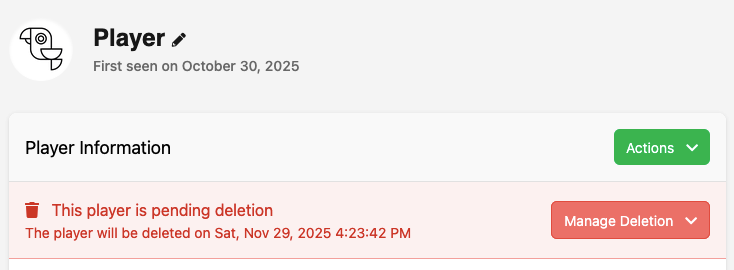
You can now see when a player has requested to delete their account and when the deletion is scheduled to occur. This information is now available in the Player Overview in the Web Console.
From this new notificaiton you can also cancel the deletion request if needed, or delete the player immediately.
🎉 Unreal SDK v10.0.0 is released 🎉 Major release featuring Epic/Google Play Games player lookup, request ID tracking with enhanced context data, automatic session token refresh fixes, plus a comprehensive internal refactor for improved stability and future maintainability.
We’ve added in-game notification management to help players stay up to date and keep their inbox organized. Here’s how it works: Retrieve all unread notifications for the logged-in player Find specific notifications using keys like trigger, purchase, or custom type Mark notifications as read once viewed Supports notifications from triggers, catalog purchases, Twitch drops, and custom server or…
We’ve added an Admin Player Operations Log to help you track actions taken on player accounts for better transparency and auditing.
Here’s how to use it:
- Go to the player’s page in the console and click the Audit Log tab
- View a detailed history of admin actions
- Logged actions include everything from granting assets to editing leaderboard scores
Exciting news! We’ve just dropped incremental scores for leaderboards, allowing you to update player scores by a modifier instead of having to fetch, increment, and then send us the new score.
This can be useful for tracking ongoing progress, like completing levels or earning points during a session.
You can update scores via our Game API or directly through the SDK.
We've added a Last Seen value to session starts — giving you an easy way to see when a player was last active.
This value can be used in a variety of ways, like tracking engagement or rewarding login streaks.
This value is returned from all of our start session endpoints under the key last_seen, in player metadata with the key ll.last_seen or can be accessed through the SDK on session start.
🎉 Unity SDK v6.3.0 is released 🎉 🚀 Exciting updates! Introducing Broadcasts for tailored player communication and Session Optionals for adding metadata like time zones. Plus, a new Time Zone converter for smoother broadcasts. Don't forget to migrate to the new ListCatalogItems v2! Read more: https://lootlocker.com/blog/preview/introducing-broadcasts-a-new-way-to-reach-your-players Find it here
🎉 Unreal SDK v9.6.0 is released 🎉 🚀 Exciting updates! Introducing Broadcasts for tailored player communication and Session Optionals for adding metadata like time zones. Plus, a new Time Zone converter for smoother broadcasts. Don't forget to migrate to the new ListCatalogItems v2! Read more: https://lootlocker.com/blog/preview/introducing-broadcasts-a-new-way-to-reach-your-players Find it here
Today we have launched Broadcasts, a new LootLocker feature that helps you connect with your players more directly than ever. With Broadcasts, you can schedule and deliver localized messages to players across one or more of your games. Each broadcast can include text, images, actions, and custom key–value pairs, giving you control over how and where messages appear in-game, whether as a news…
🎉 Unity SDK v6.2.0 is released 🎉 Exciting updates include new account connections for Epic, PlayStation, Twitch, and Discord! Enjoy enhanced performance with customizable asset filtering and UGC files are now functioning. Note: some deprecated methods have been removed. Check the full changelog for details!
🎉 Unreal SDK v9.5.0 is released 🎉 More connected account options (Epic, PlayStation, Twitch, Discord), selective simple asset filtering for big performance wins, PlayStation Network v3 support, unified PlayStation auth/session flow, Google auth code retrieval for Play Games integration, plus a UGC file handling fix.
🎉 Unity SDK v6.1.0 is released 🎉
🚀 Exciting update! We've added PlayStation Network v3 support to the SDK. Plus, we've streamlined the authentication process by combining player verification and session start into one method: VerifyPlayerAndStartPlaystationNetworkSession. Check out the full changelog for details!
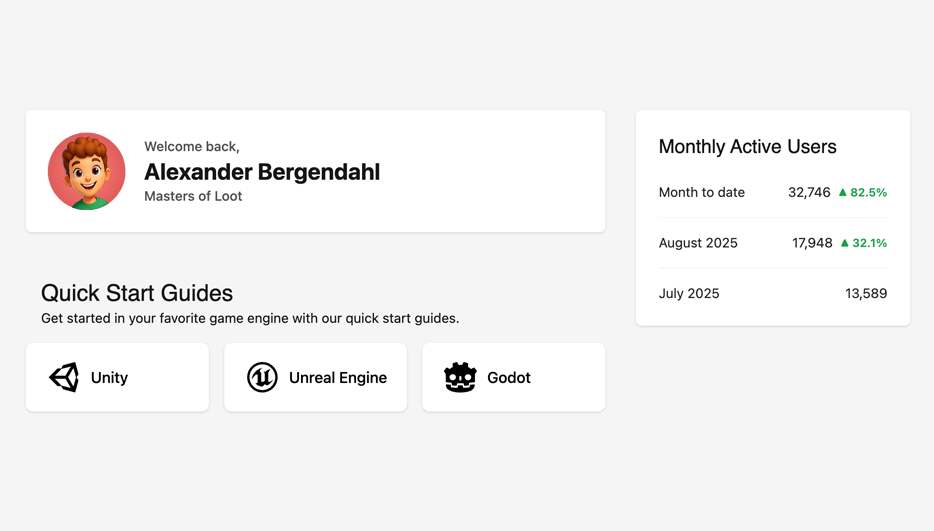
We’ve just released some updates to the console dashboard!
Here’s what has changed:
- Links to our SDK Quick Start Guides for Godot, Unity, and Unreal
- You can now see your Monthly Active Users statistics for the last 3 months
- Cleaned up clutter for a simpler, more focused dashboard
Do you have more ideas on how we can make it even better? Contact us on Discord!
LootLocker now supports cross-platform Friends and Followers! With LootLocker Friends, your players can: Send friend requests using a unique 8-character ID Accept or decline incoming requests Remove friends at any time Block or unblock players to prevent unwanted contact And beyond these core features, LootLocker Friends also supports Followers, a one-way connection where a player can follow…
🎉 Unity SDK v6.0.0 is released 🎉 Exciting updates: LootLocker now supports Epic IAPs! Plus, we've introduced a Friends system, score incrementation on leaderboards, and simplified asset listing. Check player last seen times and progression IDs. Bugs fixed for smoother sessions.
🎉 Unreal Server SDK v6.3.0 is released 🎉 Exciting updates! You can now create players from the server, enjoy a new Friends system, use a simplified asset listing for faster performance, and access progression IDs in responses. Check out the full changelog for more details!
🎉 Unreal SDK v9.4.0 is released 🎉
Epic IAP support arrives alongside the new Friends system, atomic leaderboard score incrementation and rank querying, faster simple asset listing, plus session last_seen and progression ID fields for better player state insight.

We have made some updates to the leaderboard Web Console UI as part of our ongoing work improving and streamlining the user experience. Changes Removed the modal for creating a leaderboard: The modal has been replaced with a dedicated page for creating leaderboards. New leaderboard creation page: The new creation page has a new design which better explains each field and its purpose Update the…
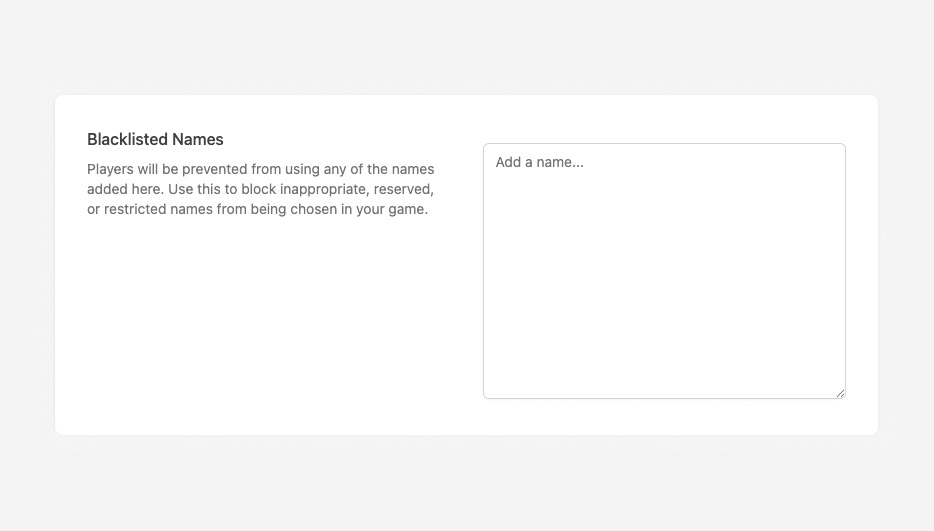
We’ve added a Player Name Blacklist that lets you block inappropriate or unwanted player names quickly and easily.
Here’s how to use it:
- Go to our new Player Settings page
- Enter or paste your names into the Blacklisted Names field, one per line
- Save your changes
You can now use Discord as an authentication platform for player sessions, available in both Platform Login and Unified Player Accounts.. This gives players a fast, familiar way to sign in with their Discord accounts and gives you powerful new tools to build more connected experiences. Here’s what you can do with Discord auth: Let players sign in with Discord for seamless access Link existing…